Mainspring macOS utility
macOS power-tuning

Make your Mac
unmistakably yours.

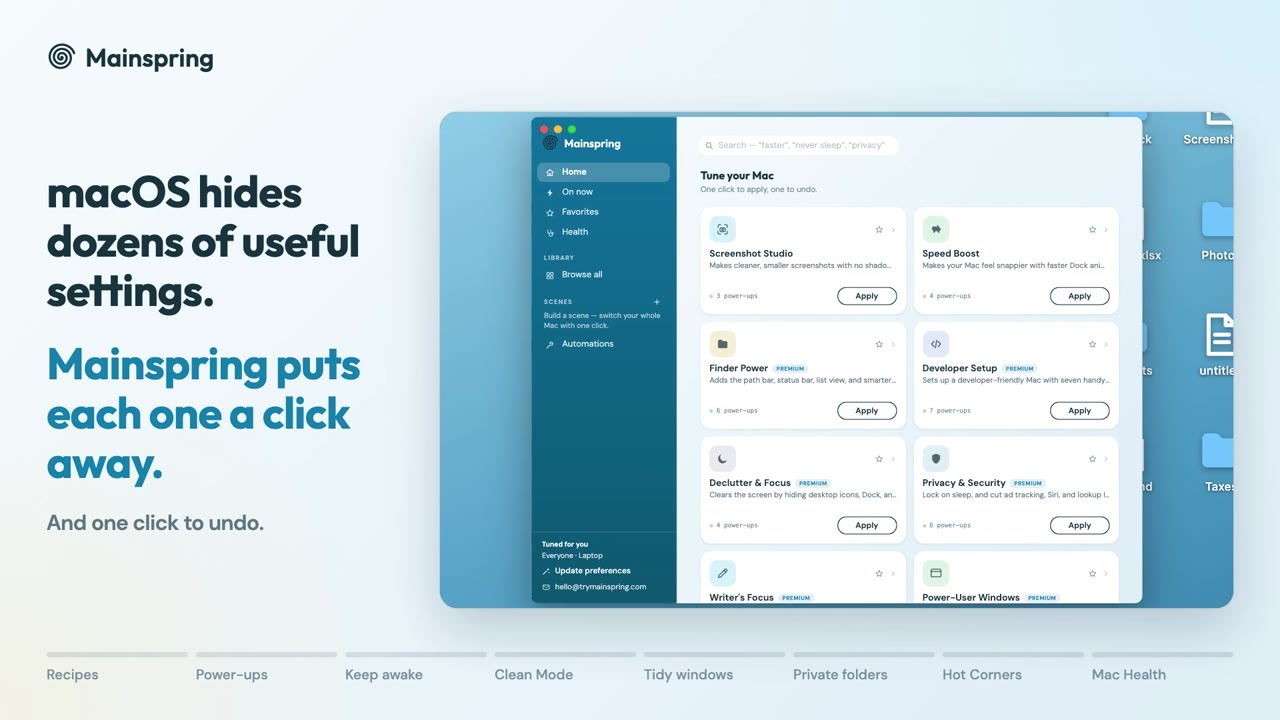
Mainspring reveals the settings macOS hides — as one-click, fully reversible power-ups. Wind it up exactly how you like it; unwind any change just as fast.

Signed & notarized by Apple · macOS 13+ · nothing leaves your Mac
Project
Mainspring
Type
Menu-bar + GUI
Power-ups
90+
Price
$29 · once
02Recipes — pre-tuned configurations

Apply a whole setup in one click.

Curated bundles of power-ups that work together. Apply as a set, revert as a set — nothing is permanent.

R-01

Speed Boost

Snappier Dock, instant animations, faster everything.

4 POWER-UPSFREE
R-02

Screenshot Studio

No shadow, no floating thumbnail, smaller files.

3 POWER-UPSFREE
R-03

Privacy & Security

Lock on sleep, kill ad tracking, Siri and lookups.

6 POWER-UPSPRO
R-04

Declutter & Focus

Hidden desktop, auto-hide Dock, a quieter screen.

4 POWER-UPSPRO
R-05

Writer's Focus

No autocorrect, smart quotes, or UI sounds.

5 POWER-UPSPRO
R-06

Power Windows

Drag from anywhere, double-click zoom, full keys.

6 POWER-UPSPRO
R-07

Finder Power

Path bar, status bar, list view, smarter search.

6 POWER-UPSPRO
R-08

Developer Setup

Hidden files, all extensions, fast key repeat.

6 POWER-UPSPRO
03Interface — the control surface

One window. Every hidden setting.

Each power-up is a real macOS setting Mainspring writes for you — labelled in plain English, and snapshotted so it flips back in a single click.

One-click recipesBundled tweaks that belong together.
Fully reversibleEvery power-up flips back instantly.
Scenes & automationSwitch your whole Mac by context.
Stays on your MacLocal only. No account, no upload.
MAINSPRING.app
Home
Recipes
On now5
Scenes
Work
Focus
Speed Boost
4 POWER-UPS
Applied
Instant Dock
No window animations
Faster Mission Control
Reduce transparency
04Index — 90+ power-ups

Every setting Apple buried.

The tweaks power users dig out of Terminal — named in plain English, and one click to flip back.

Finder

  • Show hidden files01
  • Full path in title02
  • Folders on top03
  • No .DS_Store on drives04
  • Quit Finder with ⌘Q05

Speed

  • Instant Dock06
  • No window animations07
  • Faster Mission Control08
  • Reduce transparency09
  • Silence UI sounds10

Privacy

  • Password on sleep11
  • No personalized ads12
  • Disable Siri13
  • No lookup leaks14
  • Save local, not iCloud15

Power

  • Never sleep (lid closed)16
  • Caffeinate on a timer17
  • Hot Corners (all four)18
  • Custom screenshot folder19
  • Dock size & magnify20

No Terminal. No risk.

No commands copied off a forum, nothing permanent. Mainspring writes the setting and remembers how to undo it.

# the old way
$ defaults write com.apple.dock autohide-delay -float 0
$ killall Dock
# …and good luck remembering the undo

→ Mainspring: one toggle. One click to revert.
05Automation — context switching
Scenes

Switch your whole Mac in a click

Build a scene from any mix of power-ups, then flip between contexts instantly. Nothing touches your Mac until you switch to it.

Work·BIG DOCK · SCROLLBARS
Focus·HIDE DESKTOP · SILENT
Presentation·NEVER SLEEP · DND
Automation

Let scenes apply themselves

Mainspring watches in the background and switches when your context changes — power, displays, time of day, an app opening.

On unplugBATTERY SAVER
Display connectDESK MODE
Zoom opensMEETING MODE
06Pricing — one-time license

One price. Wound for life.

$29 / once
  • Every recipe + all 90+ power-ups
  • Scenes & automation, hands-free
  • Power controls — lid-close, Caffeinate
  • Use on up to 3 Macs
  • Free updates, forever

Secure checkout via Dodo Payments · prices adjust to your country

07Notes — good to know
Is it safe? Can I really undo everything?

Yes. Every power-up is a standard macOS setting, snapshotted before it changes, so each one flips back in a single click. Recipes revert as a group, and nothing is permanent — that's the whole point.

Does any of my data leave my Mac?

No. Mainspring changes settings locally and never uploads anything. The only network calls are to verify your license.

What's the free trial?

One full day, every feature, no account or card. After that you unlock everything forever with a one-time $29 license.

Why isn't it on the Mac App Store?

Some power-ups (like keeping your Mac awake with the lid closed) need access the App Store sandbox forbids. Mainspring is Apple-signed and notarized, so Gatekeeper trusts it — it installs with a normal double-click.

How many Macs can I use it on?

One license activates up to three of your Macs. You can move a seat any time.

Ready to wind

Wind it up.

A calmer, faster, more precise Mac — one click at a time.

TermsPrivacyNotices